A ChatGPT video editor for your own footage.
Can ChatGPT edit videos? Yes, with the Rendley plugin. Attach a clip, say what it’s for, and export the edit.
- In the ChatGPT plugin directory
- Free to connect
- Edits your own footage
Ask in the chat. Get the edit back. You write the brief. Rendley cuts the video.
Reads the footage
Transcript, scenes and on-screen text.
Cuts what drags
Fillers, pauses and retakes.
Captions it
Burned in, in your brand style.
Fills the gaps
Stock or generated B-roll and music.
Exports it
A link when you ask, a project in Rendley.
Can ChatGPT edit videos?
Not on its own: ChatGPT has no timeline to cut footage or render video. Add the Rendley plugin and, on a paid plan, it can edit your clips and export the video. See the steps.
What ChatGPT can do with Rendley.
Rendley watches the footage, decides the cut, and leaves a project you can still change.
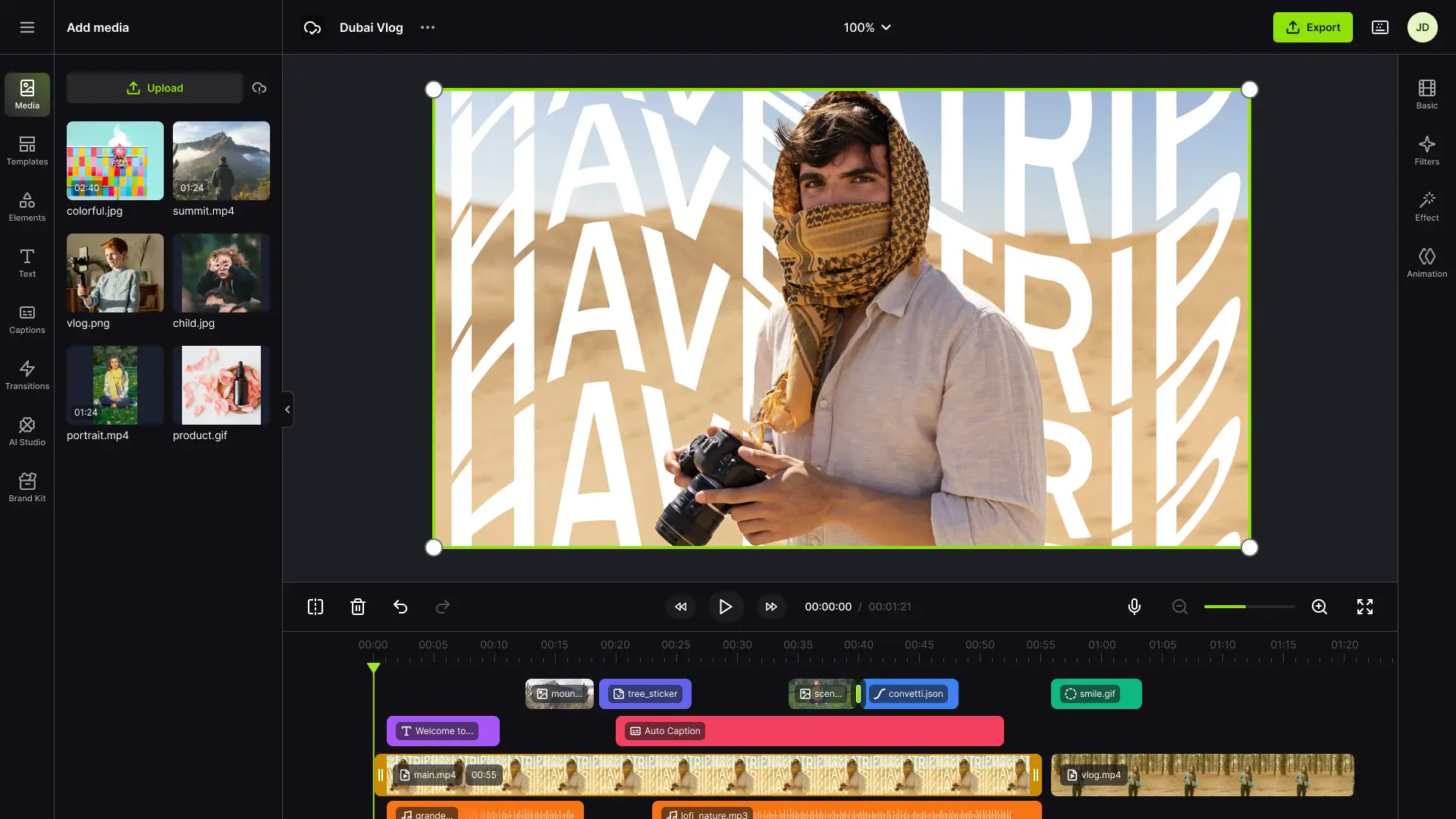
- Edits like an editor
- Finds the strong moments, cuts filler words, pauses, and retakes, and adds jump cuts and cutaways.
- Captions
- Synced to the speech word by word, styled or karaoke.
- Fills what is missing
- Free stock B-roll, or generated images, video, voiceovers, music, and sound effects on credits.
- Motion graphics
- ChatGPT writes the animation, and Rendley adds it as a clip you can edit. No credits used.
- Every format
- 9:16, 1:1, and 16:9 from one project, reframed to keep the subject in shot.
- Other languages
- Translated subtitles, or a dubbed voice with lip-sync.
- Your brand kit
- Logo, colors, fonts, and caption styles from your workspace brand kit.
- Still editable
- Every result is a Rendley Studio project. Open it and change any cut, caption, or clip.
How to edit a video in ChatGPT.
Free to install. Editing in ChatGPT starts at $29 per seat a month.
Open Rendley in ChatGPT
Find it under Plugins in ChatGPT, or use the button below.Install the plugin
Click Install plugin. No developer mode, no URL to paste.Allow access
A Rendley tab opens. Sign in and click Allow access.Describe the video
In any chat, pick Rendley from the + menu, attach a clip, and ask.
What to ask.
Say what it’s for and how long it should be, then ask for the export.
Turn my latest recording into a 30-second vertical highlight with captions
Make a Spanish version of this ad with a dubbed voice and subtitles
Find the three strongest quotes in this podcast and cut each into a captioned short
Tighten this screen recording into a step-by-step tutorial with a title for each step
Clean up the background noise and make my voice clearer
Generate two shots of a sunrise over the city for the opening
Remove the filler words and long pauses from my interview
Turn this blog post into a 45-second explainer with stock B-roll and a voiceover
Make a 20-second product video from these photos with upbeat music
Turn these three selfie clips into a UGC-style ad with a hook in the first two seconds
Remove the background behind the speaker and put them on our brand color
Turn this Canva design into a 15-second animated post
Resize my video for Instagram Reels and keep the speaker in frame
Add my logo and brand captions, then export a square and a vertical version
Cut this customer call into a 60-second testimonial with their name on screen
Add an animated bar chart of our monthly signups after the intro
Add calm music under the voiceover and lower it while I talk
Upscale this 720p clip to 1080p and export it
Frequently Asked Questions
Not on its own. ChatGPT can plan an edit and write a script or captions, but it has no timeline to cut footage or render a video. With the Rendley plugin and a paid plan, it can edit your own clips and export the video.
Not built in. Rendley adds one from the plugin directory, with no developer mode.
Open Rendley in ChatGPTIt is good at the thinking: finding moments, writing scripts, and planning the cut. Rendley does what it can’t: cuts the footage on a timeline and renders the video.
Pick Rendley from the + menu, attach the footage, and describe the result: how long it should be, the format, the captions, and what to cut. Then ask for the export.
More example promptsWith Rendley, yes for anything on the timeline: filler words, long pauses, retakes, weak sections, or a clip you name. It can also remove the background behind a speaker. It does not paint objects out of a shot.
With Rendley, yes: clean up the audio, isolate a voice, upscale a clip, or add captions and music.
No ChatGPT plan edits video by itself. The editing happens in Rendley, which you add from the plugin directory. On Business and Enterprise workspaces, an admin may need to allow the plugin first.
You can connect Rendley and plan a video for free. Editing and exporting in ChatGPT need a paid plan, from $29 per seat a month.
See plansYes. Attach the file in the chat and Rendley adds it to your project. For a file too large to attach, Rendley gives you an upload page, or you can share a link to the file.
A typical edit takes one to three minutes. Long footage and generated media take longer. ChatGPT shows Rendley’s progress while it works, so you can keep the chat open or come back to it.
The editing agent will not. It shows its plan with the credit price and waits for your approval first. Cloud exports also use credits, and they run when you ask for one.
ChatGPT shows a Download button and a link to open it in Rendley. The download link expires after a few hours, but the video stays a project in your Rendley workspace, so you can change any cut, caption, or clip and export it again.
Your next edit starts in ChatGPT.
Add Rendley, attach your footage, and describe the video.